

OrooDigital Banking services
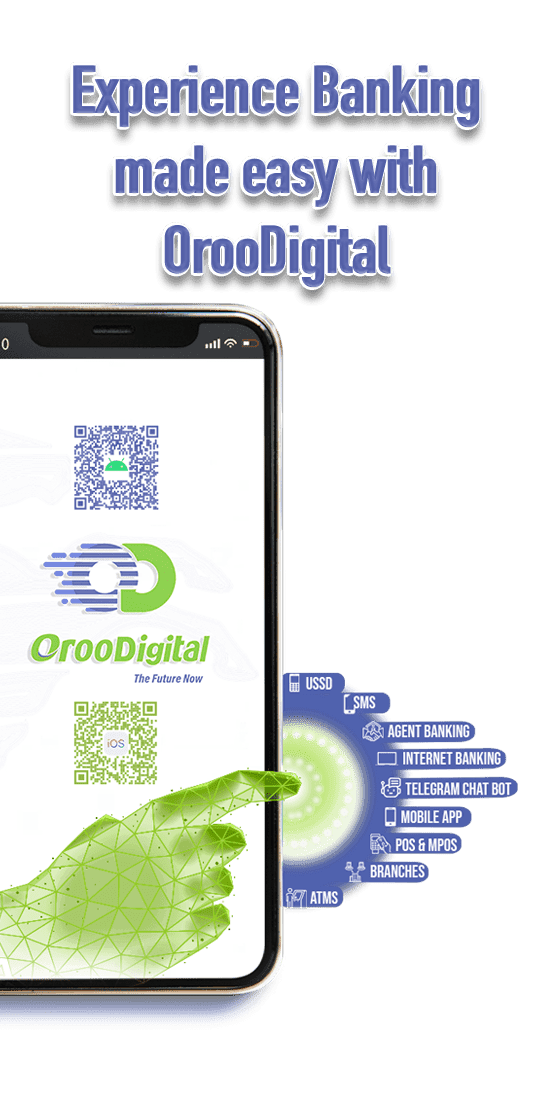
OrooDigital, the digital banking platform launched by Oromia Bank, represents a significant advancement in Ethiopia's digital banking sector. This omnichannel banking service integrates multiple digital touchpoints, including over Eight touchpoints , providing customers with seamless access to a variety of banking services.
OrooDigital’s Omni channel aims to enhance customer convnience by enabling users to manage their financial transactions across various platforms. This initiative is part of Oromia Bank's broader strategy to modernize its banking infrastructure and improve service delivery, particularly in a country undergoing rapid digital transformation due to its young demographic and extensive mobile network connectivity.
The launch of OrooDigital follows a substantial investment in digital banking technology, which is expected to significantly enhance the bank's operational capabilities. This investment will not only modernize the bank's infrastructure but also expand its payment capabilities, making banking services more accessible to both urban and rural communities. The goal is to integrate the unbanked population into the formal banking economy, thereby contributing to Ethiopia's overall digital transformation.
Why Choose Oromia Bank Digital Banking Platform?
Secure Transactions:
Oromia Bank places a strong emphasis on security, employing the latest measures to protect all transactions. This includes not only facial and fingerprint recognition features but also alphanumeric and two-factor authentication for an additional layer of security.
24/7 Accessibility:
Manage your payments anytime, anywhere, with our round-the-clock service
Multi-Channel:
Oromia Bank’s OrooDigital banking platform offers a multi-channel approach, Bank anytime, anywhere via web, mobile app, USSD, SMS, telegram bot, agents’ merchants, and branches this allowing customers to use their preferred channels based on factors like convenience, literacy level, and channel availability
Availability:
The multi-channel nature of the platform ensures that customers can continue to access banking services even if one channel is temporarily unavailable, providing a robust and resilient experience
Proactive Notifications Customization:
Customers can opt-in to receive or block real-time SMS alerts and notifications about their account activities, such as transaction updates, account balance changes, and payments.
Non-Internet Infrastructure Service:
Our SMS and USSD banking features provide access to banking services for customers with limited internet connectivity, ensuring everyone can enjoy the benefits of digital banking.
Unified Registration:
One login id and user name for both mobile & internet banking!
Enhanced Security:
Fingerprint, facial recognition, and strong passwords keep your money safe.
Self-Service:
Sign up, and retrieve passwords, all from your device – even abroad!
Multilingual Support:
The OrooDigital service is designed to support multiple languages, catering to the diverse linguistic needs of Oromia Bank’s customer base.
Customer Support Options:
Customers can request a “call me back” feature, where a call center representative will promptly contact them to address their queries or concerns.
Receipt Retrieval:
Customers can access and retrieve their transaction receipts this allow to easily view, download, and maintain records of their financial transactions.
OrooDigital Channels
Internet Banking
OrooDigital Internet banking is one of OrooDigital channels that enable users to conduct banking activities conveniently, swiftly, and securely using a smartphone, computer or laptop, providing access to banking services anytime and from anywhere,
Common functionalities of Oromia bank internet banking include:
- Transfers: Seamlessly transfer funds between the same bank accounts or to other bank accounts.
- Self-Reset Password: Easily reset your password through the platform.
- Notification Management: Customize and manage notifications for various account activities.
- Account Details: View and update your account information.
- Full Statement: Access comprehensive statements of your account transactions.
- Cash In/Out: Manage cash deposits and withdrawals through the platform.
- Bill Payments: Pay utility bills, services, and other expenses directly from your account.
- Air Ticket Booking: Purchase air tickets conveniently online.
- Airtime Top-Up: Recharge your mobile airtime directly through the platform for your own and other customers.
- Pay Merchant via Merchant ID: Make payments to merchants using their unique Merchant ID.
- Online Self-Registration: without the need to visit physical branch Register for Internet banking services online.
- Batch/Bulk Upload Transactions (Enhanced): Efficiently upload and process multiple transactions in bulk.
- Approval Rules (Enhanced): Set and manage approval rules for transactions to ensure security.
- Delegation Mode: Assign transaction responsibilities and access permissions to other users as needed.
- Set scheduled / recurring transfers.
* Corporate Internet Banking Modules
An authorization matrix in Corporate Internet Banking (CIB) is a structured framework that defines the levels of authority and approval required for various banking transactions. This matrix is essential for managing access and ensuring security within corporate banking operations. Here are the key aspects of an authorization matrix:
- User Roles: The matrix typically categorizes users into different roles such as Viewer, Enterer, and Approver. Each role has specific permissions regarding what actions they can perform.
- Transaction Types: Corporates can specify which types of transactions require approval and the level of authority needed for each transaction.
- Multi-layered Approval: The matrix allows for multiple layers of approval, meaning that higher-level approvers can authorize transactions initiated by lower-level users. For example, a Class A approver can authorize transactions pending approval from Class B or lower.
- User Management: the authorized person can manage the users including setting active and inactive status.
Maker-Checker Concept: This principle ensures that one user (the maker) initiates a transaction, while another user (the checker) must approve it, enhancing accuracy and security.
* Benefits of Corporate Internet Banking
- Enhanced Security: By requiring multiple approvals for transactions, the authorization matrix helps prevent unauthorized access and fraud.
- Control and Oversight: Corporates can maintain strict control over their banking operations, ensuring that only authorized personnel can execute significant transactions.
- Flexibility: The matrix can be tailored to meet the specific needs of the organization, allowing for adjustments as the business evolves.
Mobile Banking App
The Mobile Banking App also serves as one of the OrooDigital channels, providing convenient access to your bank account through a smartphone or tablet. Whether using your mobile phone or the Android app or IOS, customer can manage their account on the go, anytime, and anywhere.
The Mobile Banking App also serves as one of the OrooDigital channels, providing convenient access to your bank account through a smartphone or tablet. Whether using your mobile phone or the Android app or IOS, you can manage their account on the go, anytime, and anywhere.
Download: For Android | I-phone
Features and functionalities of OrooDigital Mobile app;
- Transfers
- Self-reset the passwords.
- Set scheduled / recurring transfers.
- Notification maintenance
- Cash In /out.
- Air tickets
- Bill Payments
- Airtime top-up.
- Pay the Merchant via merchant ID entry and QR code.
- Online User Registration/Self-registration
- Biometrics or Fingerprint and facial recognition security features.
SMS Banking 839
SMS command banking allows you to access and manage your bank account informational services using your mobile phone. By sending a specific text message to the bank’s designated number (839), you can initiate various commands, and the bank will respond with a message or a confirmation code displayed on your phone screen.
Commands available include:
BAL S, BAL, STM, OTP, DSTV, DSTV PAY, DSTV STM, LOCK, UNLOCK, ALERTON, ALERTOFF, CALL ME, REG and HELP <cmd>
Available Commands are listed below:
Short Name |
Description |
ALERTON |
Automate email and SMS alerts for the OroWallet account or turn on notifications |
ALERTOFF |
Turn off email and SMS alerts for OroWallet account or notifications |
CALL ME |
Send a “call me” message to the Oromia Bank customer helpdesk or call center for OroWallet and other banking services. |
REG |
New wallet registration request |
BAL |
Check current balance of OroWallet and Regular accounts |
STM |
View the last five transaction history |
DSTV PAY |
Make DStv bill payments |
LOCK |
Enable customer to lock their account |
UNLOCK |
Enable locked OroWallet access. |
STOP |
Stop accessing the OroWallet account. |
These commands provide you with a range of functionalities to manage your accounts and receive information securely through SMS banking.
USSD [*840#]
- Oromia Bank USSD channels are part of the OrooDigital, providing you with access to manage your bank account and conduct financial transactions using your mobile phone via USSD without internet infrastructure.Here are some common functionalities of USSD mobile banking:
- Self-opening OrooWallet.
- Transfers
- Cash In/ out
- Bill Payments
- Airtime top-up.
- Pay Merchant via merchant ID entry.
- Self-service for new USSD PIN
OrooDigital Telegram Bot
Oromia Bank’s OrooDigital telegram bot offers a unique and innovative Banking feature, providing customers with a seamless and secure way to transact and enquire their account directly within the popular messaging app.
Oromia Bank’s Telegram bot is designed to provide various OrooDigital functionalities, including.
- Open a wallet account or link with a bank account by your own.
- Fund Transfers
- Content sales(event)
- Pay bills
- Pay merchant
- Airtime top-up
- Mini statement up to ten transactions
- lock/unlock accounts.
- Reset passwords with the help of the call center.
OrooDigital bot
Call Centrer [840 839]
Oromia Bank has established dedicated call centers to enhance customer service and provide greater convenience. The call centers are designed to address the needs of both internal and external customers:
- External Customers: Call 840 for support with external banking needs and services.
- Internal Customers: Dial 839 for assistance with internal banking services and queries.
These call centers are fully integrated with the OrooDigital (Omni-channel) platform, allowing customers to access a range of services:
- Chat Support: Engage in chat with customer service representatives and use short codes to request a callback.
- Phone Support: Receive assistance directly via phone calls for a personalized service experience.
Mobile Banking App
The Mobile Banking App also serves as one of the OrooDigital channels, providing convenient access to your bank account through a smartphone or tablet. Whether using your mobile phone or the Android app or IOS, customer can manage their account on the go, anytime, and anywhere.
The Mobile Banking App also serves as one of the OrooDigital channels, providing convenient access to your bank account through a smartphone or tablet. Whether using your mobile phone or the Android app or IOS, you can manage their account on the go, anytime, and anywhere.
Download: For Android | I-phone
Features and functionalities of OrooDigital Mobile app;
- Transfers
- Self-reset the passwords.
- Set scheduled / recurring transfers.
- Notification maintenance
- Cash In /out.
- Air tickets
- Bill Payments
- Airtime top-up.
- Pay the Merchant via merchant ID entry and QR code.
- Online User Registration/Self-registration
- Biometrics or Fingerprint and facial recognition security features.
SMS Banking 839
SMS command banking allows you to access and manage your bank account informational services using your mobile phone. By sending a specific text message to the bank’s designated number (839), you can initiate various commands, and the bank will respond with a message or a confirmation code displayed on your phone screen.
Commands available include:
BAL S, BAL, STM, OTP, DSTV, DSTV PAY, DSTV STM, LOCK, UNLOCK, ALERTON, ALERTOFF, CALL ME, REG and HELP <cmd>
Available Commands are listed below:
Short Name |
Description |
ALERTON |
Automate email and SMS alerts for the OroWallet account or turn on notifications |
ALERTOFF |
Turn off email and SMS alerts for OroWallet account or notifications |
CALL ME |
Send a “call me” message to the Oromia Bank customer helpdesk or call center for OroWallet and other banking services. |
REG |
New wallet registration request |
BAL |
Check current balance of OroWallet and Regular accounts |
STM |
View the last five transaction history |
DSTV PAY |
Make DStv bill payments |
LOCK |
Enable customer to lock their account |
UNLOCK |
Enable locked OroWallet access. |
STOP |
Stop accessing the OroWallet account. |
These commands provide you with a range of functionalities to manage your accounts and receive information securely through SMS banking.
USSD (*840#)
Oromia Bank USSD channels are part of the OrooDigital, providing you with access to manage your bank account and conduct financial transactions using your mobile phone via USSD without internet infrastructure.
Here are some common functionalities of USSD mobile banking:
- Self-opening OrooWallet.
- Transfers
- Cash In/ out
- Bill Payments
- Airtime top-up.
- Pay Merchant via merchant ID entry.
- Self-service for new USSD PIN
OrooDigital bot
Oromia Bank’s OrooDigital telegram bot offers a unique and innovative Banking feature, providing customers with a seamless and secure way to transact and enquire their account directly within the popular messaging app.
Oromia Bank’s Telegram bot is designed to provide various OrooDigital functionalities, including.
- Open a wallet account or link with a bank account by your own.
- Fund Transfers
- Content sales(event)
- Pay bills
- Pay merchant
- Airtime top-up
- Mini statement up to ten transactions
- lock/unlock accounts.
- Reset passwords with the help of the call center.
OrooDigital bot
Call Center [840 | 839 ] (Toll-free)
Oromia Bank has established dedicated call centers to enhance customer service and provide greater convenience. The call centers are designed to address the needs of both internal and external customers:
- External Customers: Call 840 for support with external banking needs and services.
- Internal Customers: Dial 839 for assistance with internal banking services and queries.
These call centers are fully integrated with the OrooDigital (Omni-channel) platform, allowing customers to access a range of services:
- Chat Support: Engage in chat with customer service representatives and use short codes to request a callback.
- Phone Support: Receive assistance directly via phone calls for a personalized service experience.